Knowledge Base
This procedure is ONLY for macOS VST plugin registration. NOT for FL Studio macOS.
Unlock FL Studio Windows or macOS?
FL STUDIO - macOS user click here
Unlock Plugins on Windows?
Unlock macOS VST Plugins
This procedure assumes that you already have registered and have an Image-Line Account and you have downloaded and installed the relevant product/s . This procedure will unlock ALL your products with one FLRegkey.Reg file. When you buy additional products you will need to repeat this process.
DOWNLOAD YOUR REGKEY FILE 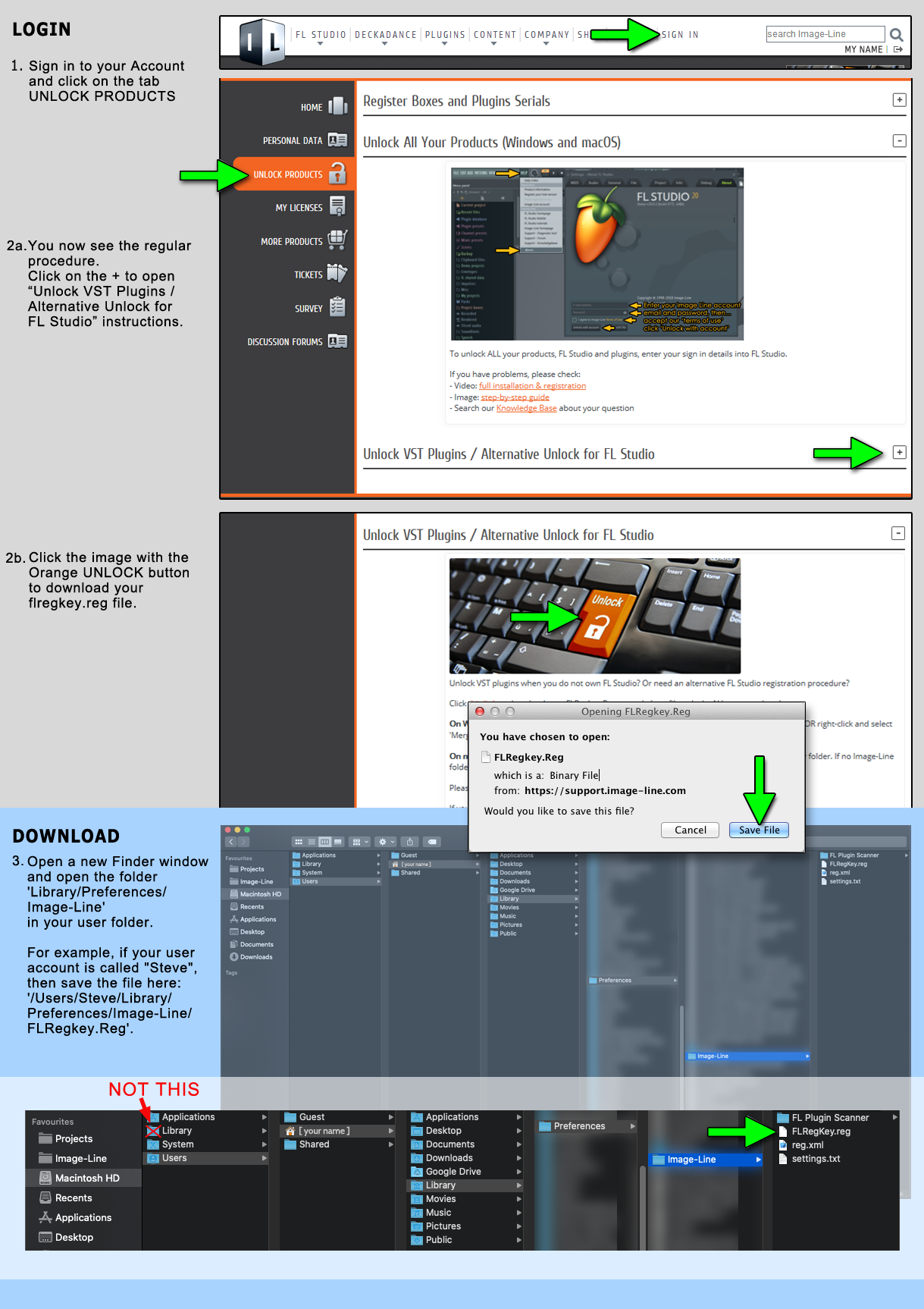
If your browser doesn't ask where to save the file, please follow these additional steps once the file has been downloaded:
- Locate the FLRegKey.reg on your hard disk in Finder. By default, most applications download to the Downloads folder.
- Open a new Finder window and open the folder 'Library/Preferences/Image-Line' in your user folder. For example, if your user account is called "Steve", then save the file here: '/Users/Steve/Library/Preferences/Image-Line/FLRegkey.Reg'.
Note: If an Image-Line folder is not available you must manually create the folder in the Preferences folder and drag the file FLRegKey.reg into to the 'Image-Line' folder.
How do I navigate to the Preferences folder in macOS 10.7 and higher?
In macOS 10.7 or 10.8 the Library folder is not displayed in the Finder anymore. To navigate to the Preferences folder please follow these steps:
- Open the Finder
- Go to the Menu Bar and open the "Go" menu.
- Select the entry: "Go to Folder..."
- Enter the path of the Preferences Folder: ~/Library/Preferences
Tip: You can display the Library folder if you press the ALT-Key while in the "Go" menu.